√√ LEARN HOW TO USE ALPHANUMERIC SORTING IN EXCEL

A// ALPHANUMERIC SORTING (WITHOUT SPACING) USING THE MID FUNCTION IN EXCEL APPLICATION; MY DISCOVERY

Alphanumeric data is a combination of alphabets and numbers that usually defines a person’s identity to an organization, institution, company, agency, association and groups. It is commonly used for Identity Cards. In Public elections, it is used for Voter Identity Cards, and demarcation of regions, districts, constituencies, electoral areas and polling stations. It is a unique form of coding that gives meaning to identity of persons and filing of documents in both the public and public sector, governments, political parties, banks, security, education, health sectors, etc.

Here are simple ways to follow with proven results for your study and learning:

MID Function in excel is a text function used to find out strings and return them from any middle part of the Excel. The formula extracts the result from the text or the string itself, the start number or position, and the string’s end position. It takes three arguments as specified below.

=MID(text, start number, number chart) to sort the data. Note that when the data is the same in terms of arrangement and number of alphanumeric, you can scroll below and get the same results for the other alphanumeric data. But if the arrangement and number of alphanumeric data are different, then you need to apply the formula separately and individually. It means that you have to scan and examine each set of alphanumeric data before you apply the mid function formula in an adjustable manner.

 Alphanumeric data: AA26NanaKwakuDuodu is in column A10 and you are to extract into five (5) columns

Extracting the Code: AA

  1. Type an equal sign
  2. Type MID after the equal sign
  3. Begin with bracket sign and then the mid function shows text, start number and number chart

(a) Select the start number which is the same as the Column number. Note that the cell in which the alphanumeric data lies determines the column number to select. For instance in this example, the start number is A10; the same as Column A10. This highlights the A10 cell with the alphanumeric data.

(b) Add a comma and type 1 as the start number

(c) Add a comma and type 2 as the chart number meaning that you want the two alphabets to be extracted.

(d) Close bracket and use the Enter key to make the extraction complete

(e) Scroll down to extract other alphabets in rows below if only they are of the same arrangement and number of letters or do it separately for different arrangements and letters.

This is the formula: =MID(A10,1,2) to get your code AA

Extracting the Number: 26

  1. Type an equal sign
  2. Type MID function after the equal sign
  3. Begin with bracket sign and then the mid function shows text, start number and number chart.

(a) Once the start number which is the same as the Column number is A10, type A10 to highlight the cell meaning that you are ready to extract a portion of data from the cell.

(b) Add a comma and type 3 as the start number; third (3rd) number counted after the AA code

(c) Add a comma and type 2 as the chart number meaning that you want the two digit numbers to be extracted.

(d) Close bracket and use the Enter key to make the extraction complete

(e) Scroll down to extract other numbers in rows below if only they are of the same arrangement and numbers or do it separately for different arrangements and numbers.

    This is the formula: =MID(A10,3,2) to get your extracted number: 26

Extracting the first name: Nana

  1. Type an equal sign
  2. Type MID function after the equal sign
  3. Begin with bracket sign and then the mid formula shows text, start number and number chart.

(a) Once the start number which is the same as the Column number is A10, type A10 to highlight the cell meaning that you are ready to extract a portion of data from the cell.

(b) Add a comma and type 5 as the start number; fifth (5th) number counted from the beginning

(c) Add a comma and type 4 as the chart number because the name is counted four (4) letters

(d) Close bracket and use the Enter key to make the extraction complete

(e) Scroll down to extract other names in rows below if only they are of the same arrangement and number of letters or do it separately for different arrangements and letters.

     This is the formula: =MID(A10,5,4) to get your extracted first name: Nana

Extracting the middle name: Kwaku

  1. Type an equal sign
  2. Type MID function after the equal sign
  3. Begin with bracket sign and then the mid formula shows text, start number and number chart

(a) Once the start number which is the same as the Column number is A10, type A10 to highlight the cell meaning that you are ready to extract a portion of data from the cell.

(b) Add a comma and type 9 as the start number; ninth (9th) number counted from the beginning

(c) Add a comma and type 5 as the chart number because the name is counted five (5) letters

(d) Close bracket and use the Enter key to make the extraction complete

(e) Scroll down to extract other names in rows below if only they are of the same arrangement and number of letters or do it separately for different arrangements and letters.

    This is the formula: =MID(A10,9,5) to get your extracted middle name: Kwaku

Extracting the surname: Duodu

  1. Type an equal sign
  2. Type MID function after the equal sign
  3. Begin with bracket sign and then the mid formula shows text, start number and number chart.

(a) Once the start number which is the same as the Column number is A10, type A10 to highlight the cell meaning that you are ready to extract a portion of data from the cell.

(b) Add a comma and type 14 as the start number; fourteenth (14th) number counted from the beginning

(c) Add a comma and type 5 as the chart number because the name is counted five (5) letters

(d) Close bracket and use the Enter key to make the extraction complete

(e) Scroll down to extract other names in rows below if only they are of the same arrangement and number of letters or do it separately for different arrangements and letters

   This is the formula: =MID(A10,14,5) to get your extracted surname: Duodu

Note that the chart number for the surname would still be extracted even with any input number beyond 5.

B// ALPHANUMERIC SORTING (WITH SPACING) USING THE MID FUNCTION IN EXCEL APPLICATION; MY DISCOVERY

MID Function in excel is a text function used to find out strings and return them from any middle part of the Excel. The formula extracts the result from the text or the string itself, the start number or position, and the string’s end position. It takes three arguments as specified below.

=MID(text, start number, number chart) to sort the

 Alphanumeric data: AA 26 Nana Kwaku Duodu is in column A18 and you are to extract into five (5) columns.

Note: Spaces in alphanumeric data are also counted as numbers

Extracting the Code: AA

1. Type an equal sign

2. Type MID after the equal sign

3. Begin with bracket sign and then the mid function shows text, start number and number chart

(a) Select the start number which is the same as the Column number. Note that the cell in which the alphanumeric data lies determines the column number to select. For instance in this example, the start number is A18; the same as Column A18. This highlights the A18 cell with the alphanumeric data.

(b) Add a comma and type 1 as the start number

(c) Add a comma and type 2 as the chart number meaning that you want the two alphabets to be extracted.

(d) Close bracket and use the Enter key to make extraction complete

(e) Scroll down to extract other alphabets in rows below if only they are of the same arrangement and number of letters or do it separately for different arrangements and letters.     

This is the formula: =MID(A18,1,2) to get your code AA

Extracting the Number: 26

1. Type an equal sign

2. Type MID function after the equal sign

3. Begin with bracket sign and then the mid function shows text, start number and number chart

(a) Once the start number which is the same as the Column number is A18, type A18 to highlight the cell meaning that you are ready to extract a portion of data from the cell.

(b) Add a comma and type 4 as the start number; fourth (4th) number counted after the AA code

(c) Add a comma and type 2 as the chart number meaning that you want the two digit numbers to be extracted.

(d) Close bracket and use the Enter key to make extraction complete

(e) Scroll down to extract other names in rows below if only they are of the same arrangement and number of letters or do it separately for different arrangements and letters.

    This is the formula =MID(A18,4,2) to get your extracted number: 26

Extracting the first name: Nana

1. Type an equal sign

2. Type MID function after the equal sign

3. Begin with bracket sign and then the mid formula shows text, start number and number chart

(a) Once the start number which is the same as the Column number is A18, type A18 to highlight the cell meaning that you are ready to extract a portion of data from the cell.

(b) Add a comma and type 7 as the start number; seventh (7th) number counted from the beginning

(c) Add a comma and type 4 as the chart number because the name is counted four (4) letters

(d) Close bracket and use the Enter key to make extraction complete

(e) Scroll down to extract other names in rows below if only they are of the same arrangement and number of letters or do it separately for different arrangements and letters.

     This is the formula: =MID(A18,7,4) to get your extracted first name: Nana

Extracting the middle name: Kwaku

1. Type an equal sign

2. Type MID function after the equal sign

3. Begin with bracket sign and then the mid formula shows text, start number and number chart

(a) Once the start number which is the same as the Column number is A18, type A18 to highlight the cell meaning that you are ready to extract a portion of data from the cell.

(b) Add a comma and type 12 as the start number; twelfth (12th) number counted from the beginning

(c) Add a comma and type 5 as the chart number because the name is counted five (5) letters

(d) Close bracket and use the Enter key to make extraction complete

(e) Scroll down to extract other names in rows below if only they are of the same arrangement and number of letters or do it separately for different arrangements and letters. 

     This is the formula: =MID(A18,12,5) to get your extracted middle name: Kwaku

Extracting the Surname: Duodu

1. Type an equal sign

2. Type MID function after the equal sign

3. Begin with bracket sign and then the mid formula shows text, start number and number chart

(a) Once the start number which is the same as the Column number is A18, type A18 to highlight the cell meaning that you are ready to extract a portion of data from the cell.

(b) Add a comma and type 18 as the start number; eighteenth (18th) number counted from the beginning

(c) Add a comma and type 5 as the chart number because the name is counted five (5) letters

(d) Close bracket and use the Enter key to make extraction complete

(e) Scroll down to extract other names in rows below if only they are of the same arrangement and number of letters or do it separately for different arrangements and letters.

   This is the formula: =MID(A18,18,5) to get your extracted surname name: Duodu

Note that the chart number for the surname (last) would still be extracted even with any input number beyond 5.

C// WHEN ALPHANUMERIC ENDS WITH A SPACED NUMBER

MID Function in excel is a text function used to find out strings and return them from any middle part of the Excel. The formula extracts the result from the text or the string itself, the start number or position, and the string’s end position. It takes three arguments as specified below.

=MID(text, start number, number chart) to sort the

 Alphanumeric data: AANanaKwakuDuodu 26 is in column A3 and you are to extract into five (5) columns.

Note that spaced numbers are counted. Also the space before number 26 is also counted to make it three (3) instead of two (2) for the chart number after the start number.

Extracting the Code: AA

  1. Type an equal sign
  2. Type MID after the equal sign
  3. Begin with bracket sign and then the mid function shows text, start number and number chart

(a) Select the start number which is the same as the Column number. Note that the cell in which the alphanumeric data lies determines the column number to select. For instance in this example, the start number is A3; the same as Column A3. This highlights the A3 cell with the alphanumeric data.

(b) Add a comma and type 1 as the start number

(c) Add a comma and type 2 as the chart number meaning that you want the two digit numbers to be extracted.

(d) Close bracket and use the Enter key to make extraction complete

(e) Scroll down to extract other names in rows below if only they are of the same arrangement and number of letters or do it separately for different arrangements and letters.

This is the formula: =MID(A3,1,2) to get your code AA

Extracting the first name: Nana

1.Type an equal sign

2. Type MID function after the equal sign

3. Begin with bracket sign and then the mid formula shows text, start number and number chart

(a) Once the start number which is the same as the Column number is A3, type A3 to highlight the cell meaning that you are ready to extract a portion of data from the cell.

(b) Add a comma and type 3 as the start number; third (3rd) number counted from the beginning

(c) Add a comma and type 4 as the chart number because the name is counted four (4) letters

(d) Close bracket and use the Enter key to make extraction complete

(e) Scroll down to extract other names in rows below if only they are of the same arrangement and number of letters or do it separately for different arrangements and letters.

     This is the formula: =MID(A3,3,4) to get your extracted first name: Nana

Extracting the middle name: Kwaku

1.Type an equal sign

2. Type MID function after the equal sign

3. Begin with bracket sign and then the mid formula shows text, start number and number chart

(a) Once the start number which is the same as the Column number is A3, type A3 to highlight the cell meaning that you are ready to extract a portion of data from the cell.

(b) Add a comma and type 7 as the start number; seventh (7th) number counted from the beginning

(c) Add a comma and type 5 as the chart number because the name is counted five (5) letters

(d) Close bracket and use the Enter key to make extraction complete

(e) Scroll down to extract other names in rows below if only they are of the same arrangement and number of letters or do it separately for different arrangements and letters.

     This is the formula: =MID(A3,7,5) to get your extracted first name: Kwaku

Extracting the surname: Duodu

1.Type an equal sign

2. Type MID function after the equal sign

3. Begin with bracket sign and then the mid formula shows text, start number and number chart

(a) Once the start number which is the same as the Column number is A3, type A3 to highlight the cell meaning that you are ready to extract a portion of data from the cell.

(b) Add a comma and type 12 as the start number; seventh (12th) number counted from the beginning

(c) Add a comma and type 5 as the chart number because the name is counted five (5) letters

(d) Close bracket and use the Enter key to make extraction complete

(e) Scroll down to extract other names in rows below if only they are of the same arrangement and number of letters or do it separately for different arrangements and letters.

     This is the formula: =MID(A3,12,5) to get your extracted first name: Duodu

Extracting the spaced number: 26

Note that spaced numbers are counted. Also the space before the end number 26 is also counted to make it three (3) instead of two (2) for the chart number after the start number.

1.Type an equal sign

2. Type MID function after the equal sign

3. Begin with bracket sign and then the mid formula shows text, start number and number chart

(a) Once the start number which is the same as the Column number is A3, type A3 to highlight the cell meaning that you are ready to extract a portion of data from the cell.

(b) Add a comma and type 18 as the start number; eighteenth (18th) number counted from the beginning

(c) Add a comma and type 3 as the chart number because the number is counted three (3) letters including the space.

(d) Close bracket and use the Enter key to make extraction complete

(e) Scroll down to extract other numbers in rows below if only they are of the same arrangement and numbers or do it separately for different arrangements and numbers.

     This is the formula: =MID(A3,18,3) to get your extracted first name: 26

D// SORTING ONLY NAMES (NON – NUMERIC) USING THE MID FUNCTION

Extract the name: Nana Kwaku Duodu into three (3) columns

Extracting the first name: Nana

1.Type an equal sign

2. Type MID function after the equal sign

3. Begin with bracket sign and then the mid formula shows text, start number and number chart

(a) Once the start number which is the same as the Column number is A23, type A23 to highlight the cell meaning that you are ready to extract a portion of data from the cell.

(b) Add a comma and type 1 as the start number; from the beginning

(c) Add a comma and type 4 as the chart number because the name is counted four (4) letters

(d) Close bracket and use the Enter key to make extraction complete

(e) Scroll down to extract other names in rows below if only they are of the same arrangement and number of letters or do it separately for different arrangements and letters.

     This is the formula: =MID(A23,1,4) to get your extracted first name: Nana

Extracting the middle name: Kwaku

1.Type an equal sign

2. Type MID function after the equal sign

3. Begin with bracket sign and then the mid formula shows text, start number and number chart

(a) Once the start number which is the same as the Column number is A23, type A23 to highlight the cell meaning that you are ready to extract a portion of data from the cell.

(b) Add a comma and type 6 as the start number; fifth (5th) number from the beginning

(c) Add a comma and type 5 as the chart number because the name is counted five (5) letters or type 6 just like the start number

(d) Close bracket and use the Enter key to make extraction complete

(e) Scroll down to extract other names in rows below if only they are of the same arrangement and number of letters or do it separately for different arrangements and letters.

     This is the formula: =MID(A23,6,5) to get your extracted middle name: Kwaku

Extracting the surname: Duodu

1.Type an equal sign

2. Type MID function after the equal sign

3. Begin with bracket sign and then the mid formula shows text, start number and number chart

(a) Once the start number which is the same as the Column number is A23, type A23 to highlight the cell meaning that you are ready to extract a portion of data from the cell.

(b) Add a comma and type 6 as the start number; fifth or sixth (5th or 6th) number from the beginning

(c) Add a comma and type 5 as the chart number because the name is counted five (5) letters or more than five (5); even 12 or more

(d) Close bracket and use the Enter key to make extraction complete

(e) Scroll down to extract other names in rows below if only they are of the same arrangement and number of letters or do it separately for different arrangements and letters.

   This is the formula: =MID(A23,12,5) or =MID(A23,12,12) to get your extracted surname: Duodu

Note that the chart number for the surname would still be extracted even with any input number beyond 5.

E// WHEN ALPHANUMERIC DATA HAS SAME ARRANGEMENT AND STRUCTURE

MID Function in excel is a text function used to find out strings and return them from any middle part of the Excel. The formula extracts the result from the text or the string itself, the start number or position, and the string’s end position. It takes three arguments as specified below.

=MID(text, start number, number chart) to sort the data. Note that when the alphanumeric data is the same in terms of arrangement and structure, you can scroll below and get the same results for the other alphanumeric data.

EXTRACTING SPECIFIC DATA IN COLUMN (B) 3 – 12 OF THE EXCEL TABLE

  1. Type an equal sign in the selected cell
  2. Type MID function after the equal sign
  3. Begin with bracket sign and then the mid formula shows text, start number and number chart

(a) Once the start number in the table is Column number C3, type C3 to highlight the cell meaning that you are ready to extract a portion of data from the cell.

(b) Add a comma and appropriate number as the start number; that is the number counted from the beginning

(c) Add a comma and type the corresponding chart number to reflect selected data by their counted letters or numbers

(d) Close bracket and use the Enter key to make the extraction complete

(e) Scroll down to get the same results for other cells.

F// WHEN ALPHANUMERIC DATA HAS MIXED/DIFFERENT ARRANGEMENT OF VEHICLE TYPE AND MANUFACTURING YEAR

MID Function in excel is a text function used to find out strings and return them from any middle part of the Excel. The formula extracts the result from the text or the string itself, the start number or position, and the string’s end position. It takes three arguments as specified below.

=MID(text, start number, number chart) to sort the data. Note that when the alphanumeric data is the same in terms of arrangement and structure, you can scroll below and get the same results for the other alphanumeric data.

EXTRACTING SPECIFIC DATA OF COLUMN (C)3 – 12 IN THE EXCEL TABLE

  1. Type an equal sign in the selected cell
  2. Type MID function after the equal sign
  3. Begin with bracket sign and then the mid formula shows text, start number and number chart

(a) Once the start number in the table is Column number C3, type C3 to highlight the cell meaning that you are ready to extract a portion of data from the cell.

(b) Add a comma and appropriate number as the start number; that is the number counted from the beginning

(c) Add a comma and type the corresponding chart number to reflect selected data by their counted letters or numbers

(d) Close bracket and use the Enter key to make the extraction complete

(e) Apply the mid function formula for other cells individually if alphanumeric structures are different or scroll down if alphanumeric structures are the same

G// WHEN ALPHANUMERIC DATA HAS MIXED/DIFFERENT ARRANGEMENT OF VEHICLE ODOMETER READING

MID Function in excel is a text function used to find out strings and return them from any middle part of the Excel. The formula extracts the result from the text or the string itself, the start number or position, and the string’s end position. It takes three arguments as specified below.

=MID(text, start number, number chart) to sort the data. Note that when the alphanumeric data is the same in terms of arrangement and structure, you can scroll below and get the same results for the other alphanumeric data.

EXTRACTING SPECIFIC DATA OF COLUMN (C) 8 – 17 IN THE EXCEL TABLE

  1. Type an equal sign in the selected cell
  2. Type MID function after the equal sign
  3. Begin with bracket sign and then the mid formula shows text, start number and number chart

(a) Once the start number in the table is Column number C8, type C8 to highlight the cell meaning that you are ready to extract a portion of data from the cell.

(b) Add a comma and appropriate number as the start number; that is the number counted from the beginning

(c) Add a comma and type the corresponding chart number to reflect selected data by their counted letters or numbers

(d) Close bracket and use the Enter key to make the extraction complete

(e) Apply the mid function formula for other cells individually if alphanumeric structures are different or scroll down if alphanumeric structures are the same

THANK YOU FOR STUDYING AND LEARNING – NANA KWAKU DUODU

♦LEAVE CALCULATION TABLE IN GHANA 2022

Β 

LEAVE CALCULATION TABLE IN GHANA 2022

The general public is hereby notified thatΒ Sunday,
25thΒ December, 2022
Β marksΒ Christmas
DayΒ 
which is a Statutory Public Holiday.

However, in view of the fact that 25thΒ December,
2022 falls on a Sunday, His Excellency, the President of the Republic of Ghana,
has by Executive Instrument (E.I), in accordance with Section 2 of the Public
Holidays and Commemorative Days Act, (Act 601) declaredΒ Tuesday,
27thΒ December, 2022
Β as an additional Public
Holiday and should be observed as such throughout the country.

Source:

AMBROSE DERY (MP)

MINISTER FOR THE INTERIOR

♦ LIST OF PUBLIC HOLIDAYS IN GHANA

LIST OF PUBLIC HOLIDAYS IN GHANA 2022Β 

LAWS OF GHANA

PUBLIC HOLIDAYS (AMENDMENT) ACT, 2019 ACT 986

ARRANGEMENT OF SECTIONS

Section

  1. Short Title of Act 601 amended
  2. Section 1 of Act 601 amended
  3. Section 4A inserted
  4. Section 7 of Act 601 amended
  5. Schedule to Act 601 amended

REPUBLIC OF GHANA

THE NINE HUNDRED AND EIGHTY-SIXTH ACT

OF THE PARLIAMENT OF THE REPUBLIC OF GHANA

ENTITLED

PUBLIC HOLIDAYS (AMENDMENT) ACT, 2019

ANΒ  ACTΒ  to amendΒ  the PublicΒ  HolidaysΒ Β  Act,Β  2001Β  (ActΒ  601) to provide for theΒ  T” day of January,Β Β  the 4thΒ  day ofΒ  AugustΒ  andΒ Β  the 21st day of SeptemberΒ Β  as statutoryΒ Β  publicΒ  holidaysΒ Β  andΒ  for relatedΒ Β  matters.

DATE OF ASSENT:11th April, 2019.

PASSED by Parliament and assented to by the President:

Short Title to Act 601 amended

  1. The Pubic Holidays Act, 2001 (Act 601) referred to in this Act as the “principal enactment” is amended by the substitution for theΒ  Short Title, of “Public Holidays and Commemorative Days Act,Β Β  2001 (Act 601)”.

Section 1 of Act 601 amended

  1. The principal enactment is amended in section 1 by the insertion before the word “Schedule”, of “First”.

Section 4A inserted

  1. The principal enactment is amended by the insertion after section 4, of .

“Commemorative days

4A.Β  A day specified in the Second Schedule shall be celebrated as a commemorative day.”.

Section 7 of Act 601 amended

  1. The principal enactment is amended by the substitution for section of

Interpretation

  1. In this Act, unless the context otherwise requires, “commemorative day” means a day other than a

. statutory publicΒ Β  holidayΒ Β  whichΒ Β  is setΒ  asideΒ  in remembranceΒ Β Β Β  ofΒ  anΒ  importantΒ Β Β Β  personΒ Β  orΒ  an importantΒ  event in the past; and

“shop” includes a store or any premises for the sale of goods.” .

Schedule to Act 601 amended

  1. The principal enactment is amended by the substitutionΒ  for the Schedule of,

FIRST SCHEDULE

PUBLIC HOLIDAYS

(section 1)

New Year’s Day (1st January)

Constitution Day (7th January)

Independence Day (6th March)

Good Friday

Easter Monday

Eid-al-Fitr (Ramadan)

Workers’ Day (Ist May)

Eid-ul-Adha Festival (Hajj)Β 

Founders’ Day (4th August)

Kwame Nkrumah Memorial Day (21st September)

Farmers Day (Ist Friday in December)

Christmas Day (25th December)

Boxing Day (26th December)

SECONDΒ Β  SCHEDULE

COMMEMORATIVE DAYS

(section 4A)

African Union Day (25th May)

Republic Day (lst July)

Date of Gazette notification: 17th April 2019

public holidays (amendment) act, 2019 act 986 – GHANA LAWΒ 

Source: http://elibrary.jsg.gov.gh β€Ί laws of ghana

Culled from the E – Library of the Judicial Service of Ghana

β–Ί ANALYSIS OF GHANA’S 2020 PARLIAMENTARY REJECTED BALLOTS BY CONSTITUENCIES

Ghana’s 2020 Parliamentary elections recorded more than 79% voter turnout. The high voter turnout comprised of valid and invalid ballot papers given and cast into ballot boxes by voters. Rejected ballots reveal that the intents of voters was not clear to count votes for a preferred candidate.    

All 275 parliamentary rejected ballots recorded 175,972 and represented 1.37% of total votes cast of 12,834,662; clear choices and intent of voters. This seemed to be minimal and insignificant especially when total valid votes recorded 12,658,890 and 98.63% as voters who determined the direct election of the 275 parliamentary candidates. This is a very strong indication of correct voting procedures administered and followed by polling officials and voters respectively in the election of parliamentary candidates through the election formula of FIRST PAST THE POST.  

The pattern of rejected ballots shows an increased trend especially with the increase of voters in the election years. Comparatively with 2016 parliamentary elections, it recorded an increase of 0.35% making it a matter of concern to all stakeholders. Read the details. 

ANALYSIS OF 2020 PARLIAMENTARY REJECTED BALLOTS IN GHANA BY CONSTITUENCIES

β–Ί ANALYSIS OF GHANA’S 2020 PARLIAMENTARY REJECTED BALLOTS BY REGIONS

Ghana’s 2020 Parliamentary elections recorded more than 79% voter turnout. The high voter turnout comprised of valid and invalid ballot papers given and cast into ballot boxes by voters. Rejected ballots reveal that the intents of voters was not clear to count votes for a preferred candidate.    

All 275 parliamentary rejected ballots recorded 175,972 and represented 1.37% of total votes cast of 12,834,662; clear choices and intent of voters. The average percentage of 1.37% rejected ballots recorded the five (5) regions of Ashanti, Greater Accra, Ahafo, Volta, and Eastern with less rejected ballots percentages unlike the eleven (11) regions of Central, Western, Bono, Western North, Bono East, Oti, Northern, Upper West, Upper East, North East and Savanna.

On the face value, this seemed to be minimal and insignificant especially when 275 constituencies valid votes recorded 12,658,890 and 98.63% as voters who determined the direct election of the 275 parliamentary candidates. But limited by the universal adult suffrage of one man one vote principle as an adult voter. Since every vote counts, rejected ballots means significant loss to both affected Voters and Candidates in Public Elections especially where elected Candidates could have changed hands.

On the other hand, 98.63% total votes cast achieved is a very strong indication of correct voting procedures administered and followed by Polling Officials and majority of voters respectively in the election of parliamentary candidates through the election formula of FIRST PAST THE POST.

The pattern of rejected ballots shows an increased trend especially with the increase of voters in the election years. Comparatively with 2016 parliamentary elections, it recorded an increase of 0.35% making it a matter of concern to all stakeholders. Read the details.

ANALYSIS OF GHANA’S 2020 PARLIAMENTARY REJECTED BALLOTS BY REGIONS

β–Ί ANALYSIS OF 2020 VOTER TURNOUTS BY CONSTITUENCIES IN GHANA’S PARLIAMENTARY ELECTIONS

Ghana’s 2020 Parliamentary Elections took place in all the 275 constituencies alongside the Presidential Elections on 7th December, 2020. Voter participation and voter turnouts in the 275 constituencies defined the extent of openness and flexibility of the election process promoted by the Election Management Body and Stakeholders in the electoral system. Read the details.

ANALYSIS OF 2020 PARLIAMENTARY VOTER TURNOUTS (CONSTITUENCIES) IN GHANA

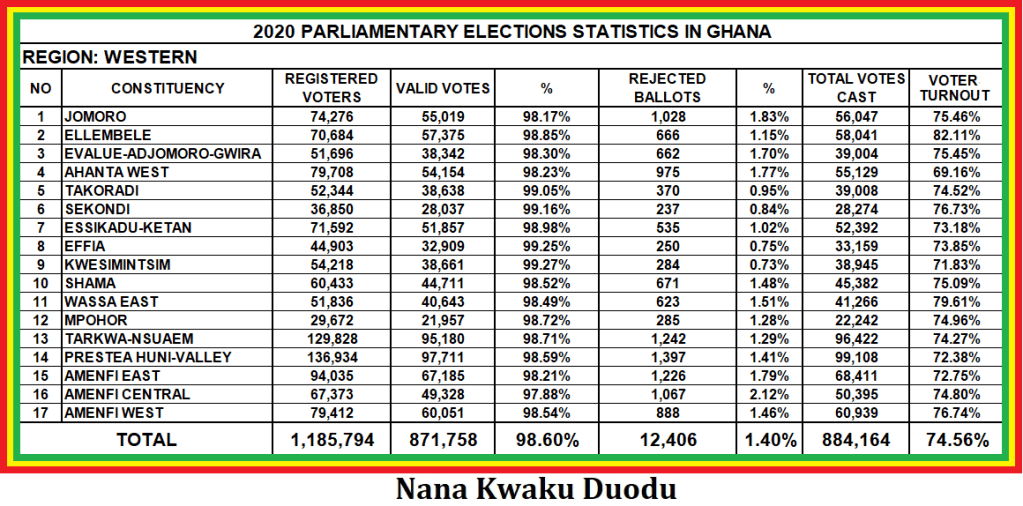
Find below clustered column Charts showing constituency and regional voter turnouts in Ghana’s 2020 Parliamentary Elections.

β–Ί STATISTICS ON 2020 PARLIAMENTARY ELECTIONS IN GHANA – VOTER TURNOUTS BY REGIONS

ANALYSIS OF PARLIAMENTARY VOTER TURNOUTS BY REGIONS

Voter turnouts measures the percentage of voters that have actually taken part in an election. This refers to registered voters whose names and biometric data are in the printed voters register and biometric verification devices in the case of Ghana’s electoral system.  

Ghana’s 2020 Parliamentary Elections took place in all the 275 constituencies alongside the Presidential Elections on 7th December, 2020. The elections in the 275 constituencies was keenly contested by 757 males and 123 females as Party Candidates and Independent Candidates.

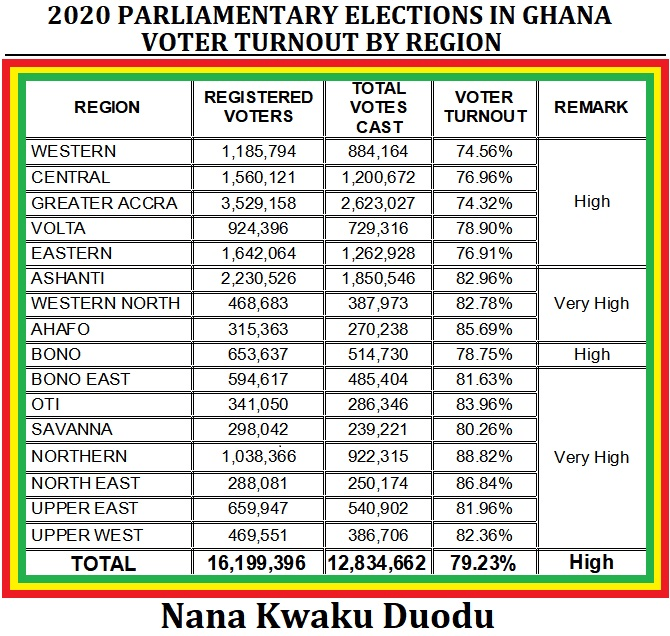
For the study and analysis of the parliamentary voter turnouts, respective constituency voter turnouts was used to determine regional voter turnouts and national voter turnout. A purview of the voter participation in the sixteen (16) regions and national is as follows:

TABLE OF 2020 PARLIAMENTARY AVERAGE VOTER TURNOUTS BY REGION

REGIONREGISTERED VOTERSTOTAL VOTES CASTVOTER TURNOUTREMARK
WESTERN1,185,794884,16474.56%High
CENTRAL1,560,1211,200,67276.96%High
GREATER ACCRA3,529,1582,623,02774.32%High
VOLTA924,396729,31678.90%High
EASTERN1,642,0641,262,92876.91%High
ASHANTI2,230,5261,850,54682.96%Very High
WESTERN NORTH468,683387,97382.78%Very High
AHAFO315,363270,23885.69%Very High
BONO653,637514,73078.75%High
BONO EAST594,617485,40481.63%Very High
OTI341,050286,34683.96%Very High
SAVANNA298,420239,22180.17%Very High
NORTHERN1,038,366922,31588.82%Very High
NORTH EAST288,081250,17486.84%Very High
UPPER EAST659,947540,90281.96%Very High
UPPER WEST469,551386,70682.36%Very High
TOTAL16,199,75612,834,66279.23%High

The Northern and Greater Accra regions recorded the highest and lowest average voter turnouts of 88.62% and 74.32% respectively. The ten (10) regions of Ashanti, Western North, Ahafo, Bono East, Oti, Savanna, Northern, North East, Upper East and Upper West recorded average voter turnouts in the 80% range whereas the six (6) regions of Western, Central, Greater Accra, Volta, Eastern and Bono recorded average voter turnouts in the 70% range. This ratio of 10:6 is a reflection of regional turnouts in the 2020 Parliamentary elections. Comparatively the ten (10) regions of Ashanti, Western North, Ahafo, Bono East, Oti, Savanna, Northern, North East, Upper East and Upper West regions, rated very high, recorded average voter turnouts more than the average national turnout of 79.23%. This seems to have a chronological and sequential order in the middle belt, northern and upper regions of the country. However the six (6) regions of Western, Central, Greater Accra, Volta, Eastern and Bono regions, rated high, recorded average voter turnouts below the average national turnout of 79.23%. This follows also a chronological and sequential order in the coastal belt and some middle belt of the country. Clearly the middle, northern and upper regions recorded higher voter turnouts than the coastal belts. Besides the further away from the national capital Accra, the higher voter turnout in those ten (10) regions unlike the six (6) regions generally with the exception of the newly created Bono region.

These two regional categories have been rated very high and high respectively to reflect the high national average voter turnout of 79.23%; almost attaining 80% average voter turnout. This is an affirmation of the recorded 16,199,396 total Registered Voters where 12,834,662 cast their votes on election day in the 275 constituencies.

A careful study of the constituency voter turnouts showed that only the Ayawaso East constituency in the Greater Accra region recorded voter turnout in the 80% – 89% range where as the other 33 constituencies recorded voter turnouts in the 70% – 79% range. With 47 constituencies in the Ashanti region, only the seven (7) constituencies of Akrofuom, Adansi Asokwa, Obuasi West, Odotobri, Manso Nkwanta, Manso Edubia and Subin recorded voter turnouts in the 70% – 79% range where as forty (40) constituencies with voter turnouts were within the 80% – 89% range.   

Though none of the regional turnouts recorded 90% – 99% range, a causal look at the ten (10) constituencies with voter turnouts in the 90% – 99% range in the three regions of Ahafo, Northern and North East are as follows. Political decisions were in favour of the National Democratic Congress (N.D.C) in the five (5) constituencies of Asutifi South, Kpandai, Wulensi, Saboba and Sagnarigu where as political decisions were in favour of the New Patriotic Party (N.P.P) in the five (5) constituencies of Zabzugu, Gushegu, Karaga, Yagaba Kubuori and Chereponi with voter turnouts. The two wining political parties shared apiece five (5) constituencies each in the ten (10) constituencies with the highest voter turnouts in the 2020 Parliamentary Elections.

A causal look at the four (4) constituencies with voter turnouts in the 60% – 69% range were recorded in four (4) regions of Western, Central, Eastern and Savanna. In the Western region, political decisions were in favour of the New Patriotic Party (N.P.P) in the Ahanta West constituency where as political decisions were in favour of the National Democratic Congress (N.D.C) in the Gomoa East, Lower Manya Krobo and Sawla/Tuna/Kalba constituencies of the Central, Eastern and Savanna regions.

COMPARISON OF VOTER TURNOUTS IN GHANA’S SIX (6) NEW REGIONS

2018 REFERENDUM AND 2020 PARLIAMENTARY AVERAGE VOTER TURNOUTS IN GHANA

TABLE 2

REGION2018 REFERENDUM TURNOUTREMARK2020 VOTER TURNOUTREMARKSTATUS
WESTERN NORTH77.69%High82.78%Very High↑ 5.09%
OTI88.33%Very High83.96%Very High↓ 4.37%
AHAFO90.41%Excellent85.69%Very High↓ 4.72%
BONO EAST85.82%Very High81.63%Very High↓ 4.19%
SAVANNA81.77%Very High80.17%Very High↓ 1.60%
NORTH EAST80.95%Very High86.84%Very High↑ 5.89%

Table 2 shows the comparison between voter turnouts in the 2018 referendum elections and 2020 parliamentary voter turnouts in the Six (6) regions of Western North, Oti, Ahafo, Bono East, Savanna and North East. Analytically, the two (2) regions of Western North and North East recorded 5.09% and 5.89% increased voter turnouts in the 2020 regional parliamentary turnouts. However, the four (4) regions of Oti, Ahafo, Bono East and Savanna recorded decreased voter turnouts of 4.37%, 4.72%, 4.19% and 1.60% in the corresponding order. It is important to note that all the six (6) newly created regions recorded status of very high voter turnouts in the 80% – 89% category; even with comparative decrease voter turnouts in the four (4) regions. Comparatively, the newly created regions of Oti, Ahafo, Bono East, Savanna and North maintained very high voter turnouts in the parliamentary elections whereas Western North region improved upon its average voter turnout from the 70% range to the 80% range.

The causal factors can generally be attributed to the alleged bloated voters register, and strong demand for the creation of new regions. The argument is that if the increase of voter turnouts for Western North and North East regions can be attributed to low strength of the bloated voters register but high demand for creation of new regions, then the decrease of voter turnouts in the Oti, Ahafo, Bono East and Savanna regions is the result of high strength in the bloated voters register but fairly high demand for creation of a new region. It means that the compilation of a new voters register in 2020 that replaced the 2018 voters registers in these six (6) regions and especially in the four (4) regions of Oti, Ahafo, Bono East and Savanna altered the voter turnouts as a true reflection of voter participation in the 2020 parliamentary elections.

It is important to note that Ghana’s electoral system thrives on universal adult suffrage with the right to vote as an adult and fashioned on the principle of one man; one vote. These regional voter turnouts indicate that voter participation in the parliamentary elections at all the 275 constituencies was augmented by constitutional provisions with the right to register and vote in public elections and referenda (Article 45 of the 1992 constitution). The new Public Elections Regulations, 2020 (C.I. 127) allowed verification by facial means with the help of Party Agents at Polling Stations in the failure of the Biometric Verification Devices to verify fingerprints of voters  

It means that the Electoral Commission enforced this right through legal and pragmatic measures such as public education, training of election officials, supply of adequate election materials, with the collaboration of stakeholders like the Political Parties, Security, District Assemblies, electorate, Voters.

It is also important to note that Political Parties with targeted campaign messages, jingles, songs and slogans and strategies used demographic factors such as age, sex, population and land size to influence and shape the voting pattern in the 275 constituencies.

Voter turnout can be referred as valid and invalid ballot papers as long as these ballot papers reflect the actual number of voters who were qualified and voted in the election. This is important to Candidates, Political Parties, Electoral Commission and other Stakeholders because higher voter turnout is a plus to the enforcement of the right to vote in public elections as well as the opportunities to increase Candidate votes and chances of being elected.

Besides, a high voter turnout means increased understanding of the electorate to make political decisions and elect leaders in a decisive and democratic  way other than use of aggressive and violent means. It means to say that the high voter turnout percentage at the various 275 constituencies is show of confidence in the electoral process and a good sign of the ever improving Ghana’s democracy. It shows that the electorate exercised their right as voters to maintain or elect new political leaders as their representatives.           

Writer: Nana Kwaku Duodu

β–Ί 2020 PRESIDENTIANTIAL ELECTION IN GHANA: 2020 PRESIDENTIAL NOMINATION FEE (REFUNDABLE AND NON – REFUNDABLE)

The threshold of more than 25% of total Valid Votes determined the qualification and disqualification of Presidential Candidates who contested in the Presidential Election on 7th December 2020 in Ghana. Source of data is from the Parliamentary Results Summary Forms on the Electoral Commission of Ghana Website. This is a provision of the Law specified in Regulation 46 (3b) of the Public Elections Regulations, 2020. 

Twelve Presidential Candidates contested the election with eleven on the sponsorship of Political Parties and one as an Independent Presidential Candidate. The Party Presidential Candidates are Nana Addo Dankwa Akufo Addo (NPP), John Dramani Mahama (NDC), Christian Kwabena Andrews (GUM), Ivor Kwabena Greenstreet (CPP), Akua Donkor (GFP), Henry Herbert Lartey (GCPP), Hassan Ayariga (APC), Kofi Percival Akpaloo (LPG), David Apesera (PNC), Bridgette Dzogbenuku (PPP) and Nana Konadu Agyeman Rawlings (NDP). The only Independent Presidential Candidate is Alfred Kwame Asiedu Walker (IND).

Only Nana Addo Dankwa Akufo Addo (NPP) and John Dramani Mahama (NDC) recorded more than 25% of the Total Valid Votes (TVV) of 3,279,780 to qualify for refund of their Presidential Nomination Fees of GHΒ’100,000.00 each as by Law establishes. However, the Ten (10) Presidential Candidates recorded valid votes less than the threshold and therefore forfeited their nomination fees to the state.

The respective Total Valid Votes obtained by the Presidential Candidates of the NPP and the NDC are 6,730,587 and 6,213,182 representing 51.30% and 47.36% respectively of the Total Valid Votes of the Twelve (12) Presidential Candidates.

The inability of the Ten (10) Presidential Candidates to qualify for refund of their nomination fees shows their unpopularity and weakness in Presidential Election 2020. Their respective Total Valid Votes are Christian Kwabena Andrews (GUM) with 105,548 and 0.80%, Ivor Kwabena Greenstreet (CPP) with 12,200 and 0.09%, Akua Donkor (GFP) with 5,574 and 0.04%, Henry Herbert Lartey (GCPP) with 3,564 and 0.03%, Hassan Ayariga (APC) with 7,138 and 0.05%, Kofi Percival Akpaloo (LPG) with 7,683 and 0.06%, David Apesera (PNC) with 10,882 and 0.08%, Bridgette Dzogbenuku (PPP) with 6,869 and 0.05% and Nana Konadu Agyeman Rawlings (NDP) with 6,549 and 0.05%. The only Independent Presidential Candidate is Alfred Kwame Asiedu Walker (IND) with 9,704 and 0.07%. Clearly, their performances in the 2020 Presidential Election was below expectation with regard to meeting more than 25% refundable threshold of Total Valid Votes.  

It means also that their financial status is weak with great expenditure but no refund to have a financial balance especially with such parties who sponsor Presidential Candidates in Presidential Elections.

It is important to note that though the ten (10) Presidential Candidates forfeited their nomination fees to the state, it is arguably clear that they have made financial contributions to the state as good and law abiding citizens. A total amount of GHΒ’1,000,000 as Presidential Nomination Fees was paid by the Ten (10) losing Presidential Candidates and forfeited to the state as by Law establishes.   

The dominance of the N.P.P and the N.DC in Ghana’s Presidential Election shows their popularity and strength since their formation in 1992. A combination of the Total Valid Votes of the Two (2) Presidential Candidates recorded 12,943,769 of the 13,119,480 Total Valid Votes of all the 2020 Presidential Votes. This represented 98.66% of Total Valid Votes of all the 2020 Presidential Votes. It reflects in their financial strength since they get their refund whether win or loss in every Presidential Election.

The other Ten (10) Presidential Votes recorded a total of 175,711 of the 13,119,480 Total Valid Votes of all the 2020 Presidential Votes. This represented 1.34% of Total Valid Votes. In all, a total of One Million, Two Hundred Ghana Cedis (GHΒ’1,200,000) was paid by the Twelve (12) Presidential Candidates of which Two Hundred Thousand Ghana Cedis (GHΒ’200,000) is to be refunded unlike One Million Ghana Cedis (GHΒ’1,000,000).

Though Ghana’s electoral system advocates for multiparty democracy with the registration of political parties without limit to contest in Presidential and Parliamentary Elections (Article 55 (1), Political Parties Act 2000 (ACT 574), it is important for weak and new Political Parties to have strategic planning that has the goal of qualification for refund of nomination fees to determine popularity level and strength. Once a Political Party qualifies for refund of Presidential Nomination Fee, it is on the right step to winning political power in future Presidential Elections.

Besides, the constitutional duty of Political Parties is to shape the political will of the people, disseminate information on political ideas, social and economic programmes of a national character, and sponsor candidates for election to any public office other than to district assemblies or lower government unit (Article 55 (3). Strategic planning and objectives must revolve around programmes that have a direct bearing on the development of the people.

Since communication of development programmes is key to shaping the political, economic and social mindset of the people, information flow can breach the gap between leaders of Political Parties and the people in the communities. Political education, indeed, thrives in election and non – election years. This key is a door opener to increase popularity and improve chances of Candidates meeting the threshold of more than 25% of Total Valid Votes and winning political power.

It is important to note that Madam Akua Donkor (GFP) was the only Party Presidential Candidate with no Parliamentary Candidate in the 2020 Parliamentary Elections; like an Independent Presidential Candidate. For the purpose of campaign to increase chances of winning Presidential Elections, it is politically prudent for Presidential Candidates to sponsor Parliamentary Candidates in some or all the 275 constituencies. Find below Political Parties and an Independent Presidential Candidate who contested the election.

  1. New Patriotic Party (NPP)
  2. Nation Democratic Congress (NDC)
  3. Ghana Union Movement (GUM)
  4. Convention People Party (CPP)
  5. Ghana Freedom Party (GFP)
  6. Ghana Consolidated Peoples Party (GCPP)
  7. All Peoples Congress (APC)
  8. Liberal Party of Ghana (LPG)
  9. Peoples National Congress (PNC)
  10. Progressive Peoples Party (PPP)
  11. National Development Party (NDP)
  12. Independent (IND)